Ever wondered how some people appear in another country without leaving their home? 👀
That’s exactly what a fake GPS tool allows you to do.
If you’re using Android, you may have heard terms like GPS spoofing, mock location, or location changer. It might sound technical — but it’s actually very simple.
In this guide, you’ll learn what fake GPS is, how it works on Android, and how to use it with apps like LocaShift.
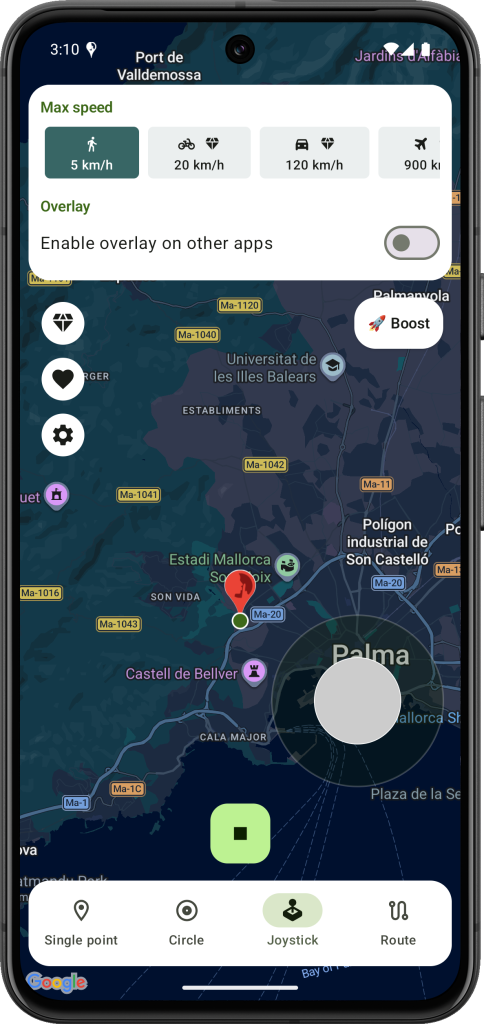
📍 What Is Fake GPS?
A fake GPS is a tool that lets you change your device’s location without moving.
Instead of sending your real position, your phone shares a custom location that you choose.
👉 For example:
- You’re in Paris → your phone shows New York
- You’re at home → apps think you’re traveling
From the app’s perspective, everything looks real.
⚙️ How Does Fake GPS Work on Android?
Android includes a built-in feature called mock location, originally designed for developers.
Here’s how a location changer works step by step:
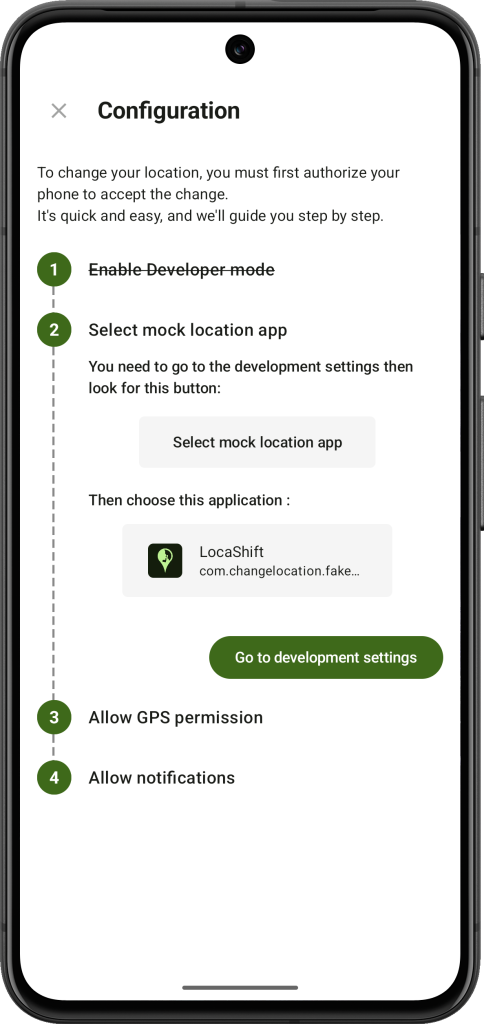
1. Enable Developer Options
Android hides advanced settings called Developer Options. This is where location simulation starts.
2. Select a Mock Location App
You choose an app like LocaShift to provide the simulated location.
3. Choose Your Location
Pick any place on the map inside the app.
4. Override Real GPS Data
Your phone now sends the selected coordinates instead of your real ones.
👉 That’s it — all apps will read the new location.
🧠 Why Android Allows GPS Spoofing
This feature isn’t a hack. It was added by Google for:
- testing apps in different locations
- simulating user behavior
- development purposes
Today, tools like LocaShift make it easy for anyone to use it.
🚀 Common Uses
Changing your location can be useful in many situations:
🎮 Gaming
Play location-based games without moving.
💬 Social Apps
Connect with people in other cities.
🌍 Travel
Explore places virtually.
🧪 Testing
Simulate movement for app testing.
🔐 Privacy
Avoid sharing your real position.
⚠️ Is It Safe to Use?
Yes, as long as you use a reliable app.
However:
- Some apps try to detect spoofing
- Incorrect setup can cause issues
- You must comply with the terms of use of other applications
Using a stable solution like LocaShift helps avoid most problems.
🛠️ How to Change Location Using Fake GPS on Android
You can get started in just a few steps:
- Install LocaShift
Once installed, the app guides you step by step through the setup process — no technical knowledge needed. Everything is clearly explained so you can get started quickly and without confusion.
- Choose a location
- Start simulation
Your device will now use the selected location.
❓ Can Apps Detect Fake GPS?
Some apps can detect location changes using:
- GPS consistency checks
- IP comparison
- Since Android 12, other apps can tell if the location is a mock location but cannot know the real location.
That said, modern tools like LocaShift are designed to make the experience smoother and more reliable.
🧭 Final Thoughts
A fake GPS is simply a way to control your location on Android.
Once you understand how it works, you can:
- explore new places virtually
- test apps more efficiently
- protect your privacy
With an app like LocaShift, everything becomes simple and accessible.
📌 FAQ
What is a fake GPS used for?
It allows you to simulate your location for gaming, testing, privacy, or accessing location-based features.
Do I need root access?
No, most apps work without root, including LocaShift.
Is GPS spoofing legal?
The feature itself is legal, but usage depends on app policies.
Why is my location not changing?
Make sure:
- Developer Options are enabled
- the correct app is selected
- no other app overrides location